
Every Minute Counts - Make it Matter.
Time Tracker Chrome Extension
Track Smarter, Work Faster – All in Your Browser.
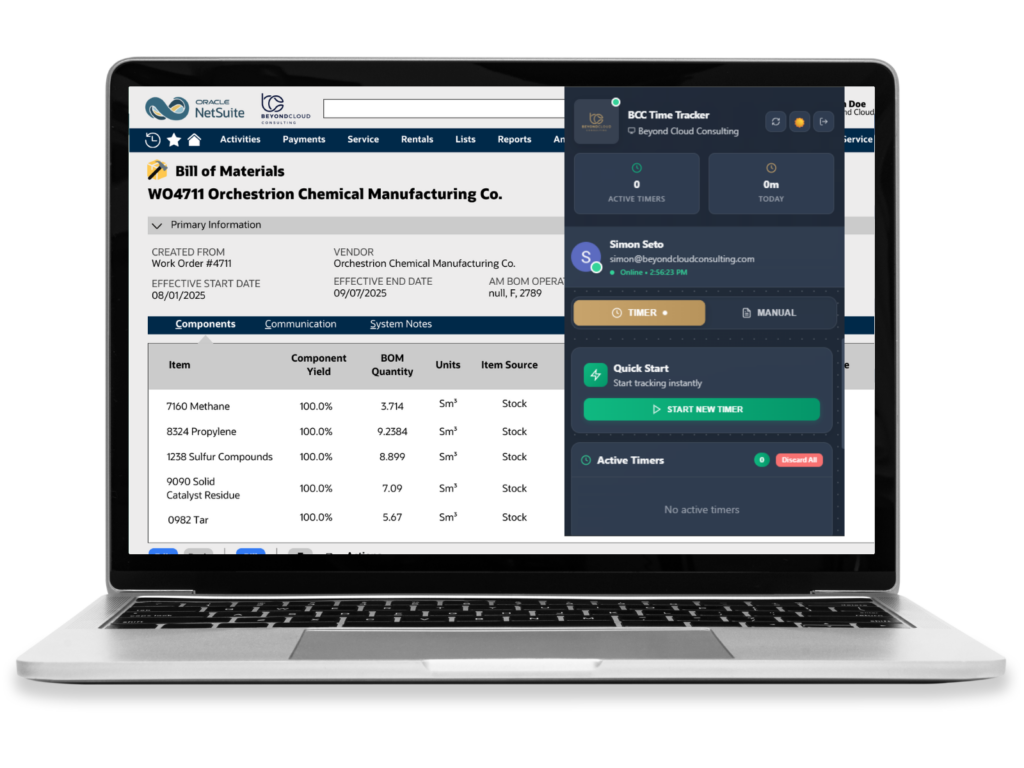
Our Time Tracker solution allows teams to capture and manage time efficiently, all within your browser of choice. Integrated directly into your team’s NetSuite instance, it allows for automated and more efficient timesheet logging.
With features like real-time reporting and automated approvals, our Time Tracker reduces manual entry, improves compliance, and provides actionable insights into workforce productivity.

Seamless NetSuite Integration
Log time entries directly into your organization’s NetSuite instance, ensuring seamless, efficient, and accurate timesheets for customers.

Google Workspace Integration
Log hours and activities from Google Docs, Sheets, Slides, Gmail, and Calendar, keeping workflows consistent and convenient for users.

Automated Timesheet Approvals
Set rules for automatic approval of timesheets, ensuring faster processing and reducing administrative overhead.

Real-Time Analytics & Insights
Gain actionable insights from with visual dashboards and reports that highlight trends, identify bottlenecks, and support better decision-making.
Key Features
-
Dedicated Widgets
Easily start, stop, or log time directly from emails or scheduled meetings with dedicated Widget buttons.
-
Automated Time Capture
Automatically records time spent on tasks and projects, reducing manual entry and ensuring accuracy for all team members.
-
Real-Time Sync
All tracked time is instantly synced to NetSuite, keeping project and payroll data up to date across platforms.
-
Customizable Pricing
Supports dynamic pricing models based on catch weight, with customer-specific pricing and discounting options.
-
Custom Reporting
Generate detailed reports and dashboards to visualize time allocation and optimize resource management.
-
Project & Task Linking
Easily associate tracked time with specific projects, tasks, or clients in NetSuite, ensuring accurate project management.
Seamless Google Workspace Tracking.
With dedicated buttons and widgets across the Google Workspace Suite – including Gmail and Google Calendar, users can track time without leaving their workflow.
This integration ensures every work activity is captured accurately, providing both employees and managers with real-time visibility into productivity.
Industry Applications



How Time Tracker Works in NetSuite
Time Tracker is a Chrome extension that connects directly to your organization’s NetSuite instance. Your team logs hours from wherever they already work — Gmail, Google Calendar, Docs, Sheets, and Slides — using dedicated buttons and widgets, and every entry lands in NetSuite as an accurate, customer-ready timesheet. Approval rules you define process routine timesheets automatically, leaving managers to review only the exceptions. Visual dashboards and reports then turn captured time into insight: trends, bottlenecks, and utilization across teams and projects. Setup is light — install the extension, connect it to NetSuite, and your team can start tracking in minutes.
Frequently Asked Questions
What is the BCC Time Tracker?
A Chrome extension that integrates time tracking directly with your NetSuite instance. Your team captures and manages time in the browser, and every entry syncs to NetSuite as an accurate timesheet.
Does it work with Google Workspace?
Yes — deeply. Dedicated buttons and widgets across Gmail, Google Calendar, Docs, Sheets, and Slides let users log hours and activities without leaving the tool they are working in.
Can timesheet approvals be automated?
Yes. You set the rules, and qualifying timesheets approve automatically — faster processing, less administrative overhead, and managers only review the exceptions.
Do entries sync to NetSuite automatically?
Yes. Time logs directly into your organization’s NetSuite instance, keeping timesheets seamless, efficient, and accurate for customer billing and project costing.
What insight do we get from tracked time?
Visual dashboards and reports highlight trends, bottlenecks, and utilization — supporting better decisions about staffing, projects, and profitability.